AG-743
AG-743 is a 4G LTE cellular router/gateway with 4 ethernet ports, WiFi, RS485 and digital inputs working on OpenWRT system. It can connect in multiple ways to the internet with dual SIM capability and a range of advanced functions for mission critical IoT or M2M applications. AG-743 also support MQTT protocol for cloud application and Modbus TCP/IP or RTU for industrial applications.
General information
| Download technical specification | Technical Specification |
Model selection
Different Gateway models are available depending on the periphery availability and type.
| Model |
Cellular Network |
GNSS |
Internal memory |
||||
| GPRS | 3G |
LTE 4G |
5G |
Flash 64MB |
NAND 512MB |
||
| AG-743 | √ | √ | |||||
| AG-743-LT-EU | √ | √ | √ | √ | √ | ||
| AG-743-LT-GL | √ | √ | √ | √ | √ | √ | |
Hardware informations
The Gateway is made on one PCB, which is fitted to the aluminum housing. The housing is made of a thick, strong aluminum profile with two end plates also made from aluminum. The surface of the housing is finished by anodizing.
At the bottom of the housing there are slots through which DIN rail clamp or any other clamp can be mounted by t-nuts.
Top view dimensions

Side view dimensions

Connectors
Top view connectors and indicators


Block diagram
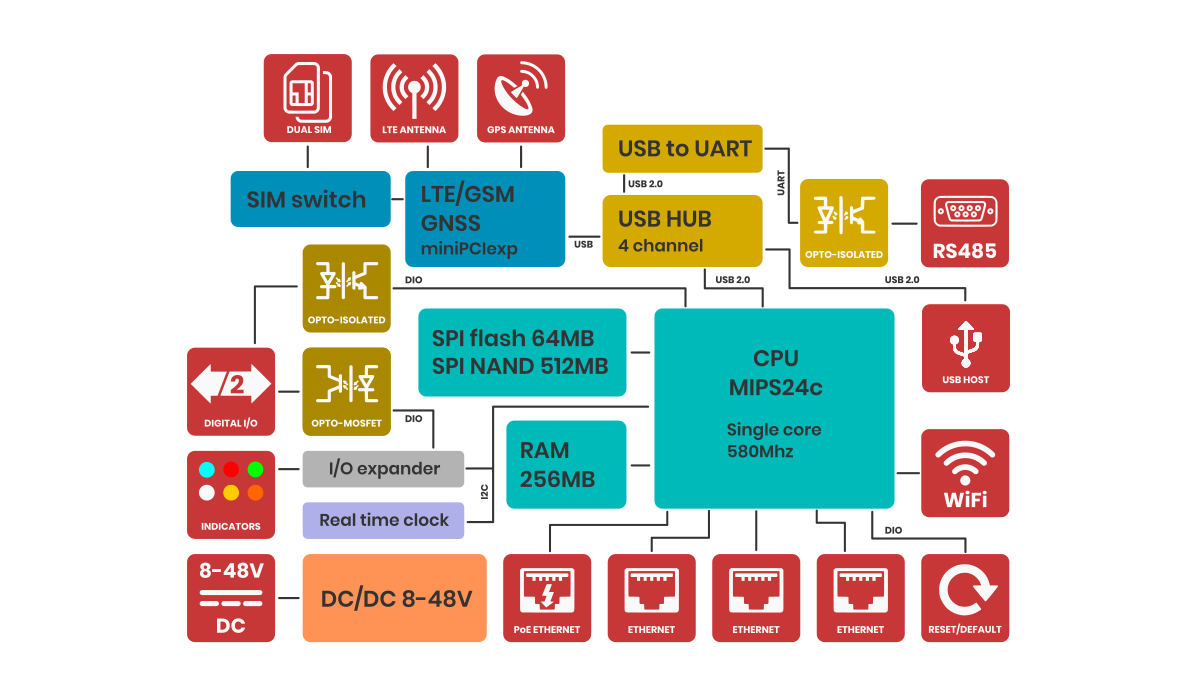
For a better understanding of the operation of the gateway, refer to the block diagram. Non-essential components have been omitted. Developers who program peripherals such as GPIOs, serial etc. will find information about them in the sections dedicated to such peripherals.
Power supply
The Gateway power supply range is 8-48V DC. You need to connect the gate according to the inscriptions at the main connector. The Gateway is protected against reverse power connection. If the polarity is reversed, the Gateway will not start.
PoE
The Gateway can also be powered via PoE in the range of input power supply using unused pairs of wires in the LAN cable. Below is the pinout of the RJ45 socket.
| Pin number |
Function |
Comment |
| 1 |
RX+ | Data |
| 2 |
RX- | Data |
| 3 |
TX+ | Data |
| 4 |
DC+ | Power supply positive |
| 5 |
DC+ | Power supply positive |
| 6 |
TX- | Data |
| 7 |
DC- | Power supply negative |
| 8 |
DC- | Power supply negative |
LTE 4G modem
Generally, the Gateway supports all versions of Quectel or Telit MiniPCI express modems. However, you can use a third-party modem, as long as the signal outputs are compatible with those of the Quectel company. For use your LTE module, select model without LTE module installed. You also need to pay attention to the power supply to the LTE module should be 3.3V.
Mobile network signal strength is also displayed on 4 LED indicators.
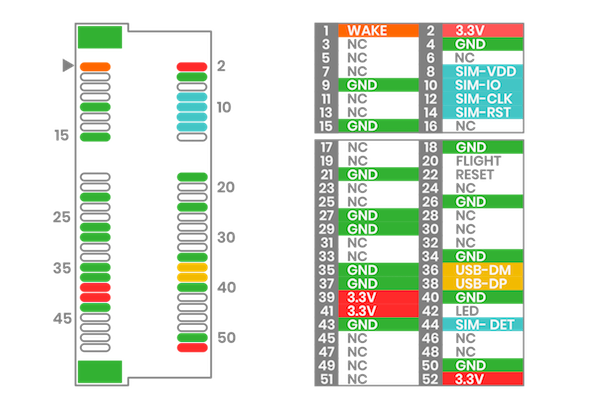
MiniPCI express pinout
Below is the description of the PCI express pinout used in the AG-702. Before installing anything other than the EC200U or EG25, be sure to check the pinout for compatibility. The LTE model is connected via a USB data bus.
GNSS
Device has wboded LTE modem along with GNSS function. In order to receive the GNSS signal, an antenna is required. There are two types of GNSS antennas: active gnss antenna and passive gnss antenna. The AG-743 supports both types of antennas, but in order for the active antenna to work properly, it is necessary to start powering the active antenna. To do this, you need to go to System > Custom Commands and select the command Turn GPS antenna to active mode.
Also on this page, you can test whether the GNSS is working properly. To do so, you need to click Activate GPS on ttyUSB7 and then Show GPS location.
Ethernet
The gateway has four RJ45 ethernet ports with LED indicators on front. The speed of each is 100Mbps. Three are configured as LAN and one as WAN. WAN supports PoE on free RJ45 pairs.
WiFi
The gateway has WiFi 2.4Ghz. By default, the WiFi is set as a hotspot and shares internet from Ethernet and from LTE via WiFi.
WiFi is used for remote configuration of the device. It does not have a long range, so it may not fully meet some requirements.
RTC
The gateway has a built-in RTC with superCAP packup power.
Serial Interface - RS485
The Gateway has one serial RS485 port. It is optically isolated. The baudrate range for RS485 port is 600 bps to 460800 bps. Note that with a longer cable, the maximum speed may drop. It is recommended to use special cables designed for RS485. The port is protected by high-power TVS diodes and GDT against electrical surges.
Digital I/O
The Gateway has one digital input and one digital output.
Digital input
The digital input is ompletely independent optically isolated input that accept an input signal level of up to 30V DC. It can can be connected either with a common plus or minus (NPN/PNP). Can be controlled with open collector. They require to be powered. The range of the signal considered as a logical 1 is from 3.5V to the maximum input voltage.
Digital output
The digital output is realized on a opto-mosfet whose load capacity is 800mA. The maximum voltage is 40V AC and 40DC. The output is only in normal open format (NO).
LED indicators
The AG-743 gateway has 10 indicators on the front panel. By default, they are programmed to perform certain functions, but they are all controlled by the processor and knowing the OpenWRT system well, change their functions. The LAN indicators are also located on the front panel.
Safety information
Operating environment
- The device is designed to be installed in clean, dust-free and insect-free places
- Operating temperature: -25 ~ 65°C (-13 ~ 149°F).
- Humidity range is 10% to 95% (non-condensing). Use the device in a dry environment.
- Away from heat sources and direct sunlight.
- It must not be exposed to acid fumes, salts and other chemicals.
- The device must not be used in places where there is a risk of gas explosion.
Use in inappropriate conditions may damage the device or shorten its life.
Electrical and power supply safety
- The device is powered with a voltage in the range of 8-48V. Voltage up to 24V is considered safe. Be especially careful when supplying them with higher voltages.
- Use only approved accessories
- Use the supplied power adapter or a good quality certified power adapter with the correct supply voltage range and sufficient power.
- Only use approved accessories like antenna etc.
Only a person with qualification and appropriate knowledge should install the device.
Malfunctioning and damaged device
- Do not disassemble the device.
- Only qualified personnel must service or repair the device or its accessories.
- If water or other liquid has got into the device, or if it looks mechanically damaged, do not connect the device, but take it to an authorized service center.
Radio frequency exposure
This device has been designed and manufactured not to exceed radio frequency energy emission limits set by regulatory agencies. To comply with RF exposure guidelines, the device must be used at least 20 cm away from a person's body. Failure to follow these instructions may result in exceeding the applicable RF exposure limits. This only applies to models with a built-in LTE modem.
What to do and what not to do
- You are solely responsible for the use of the device and any consequences of its use.
- Do not store or use the device in harsh environments such as dust, gases, oils, chemical vapors and damp places.
- Do not throw the device and its accessories. Handle with care.
- The device heats up during operation. Ensure proper ventilation.
- If you need to dispose of your device, check your local regulations for recycling and disposal of electronics.
- Route power, Ethernet, and antenna cables properly so that they cannot be accidentally pulled out.
- The device should be used and kept away from small children.