
Role Creation Guide
Quick Steps
Navigate to the Roles page and click theClick +CREATE ROLE button(top left corner). This will take you to the "Create New Role" page.button
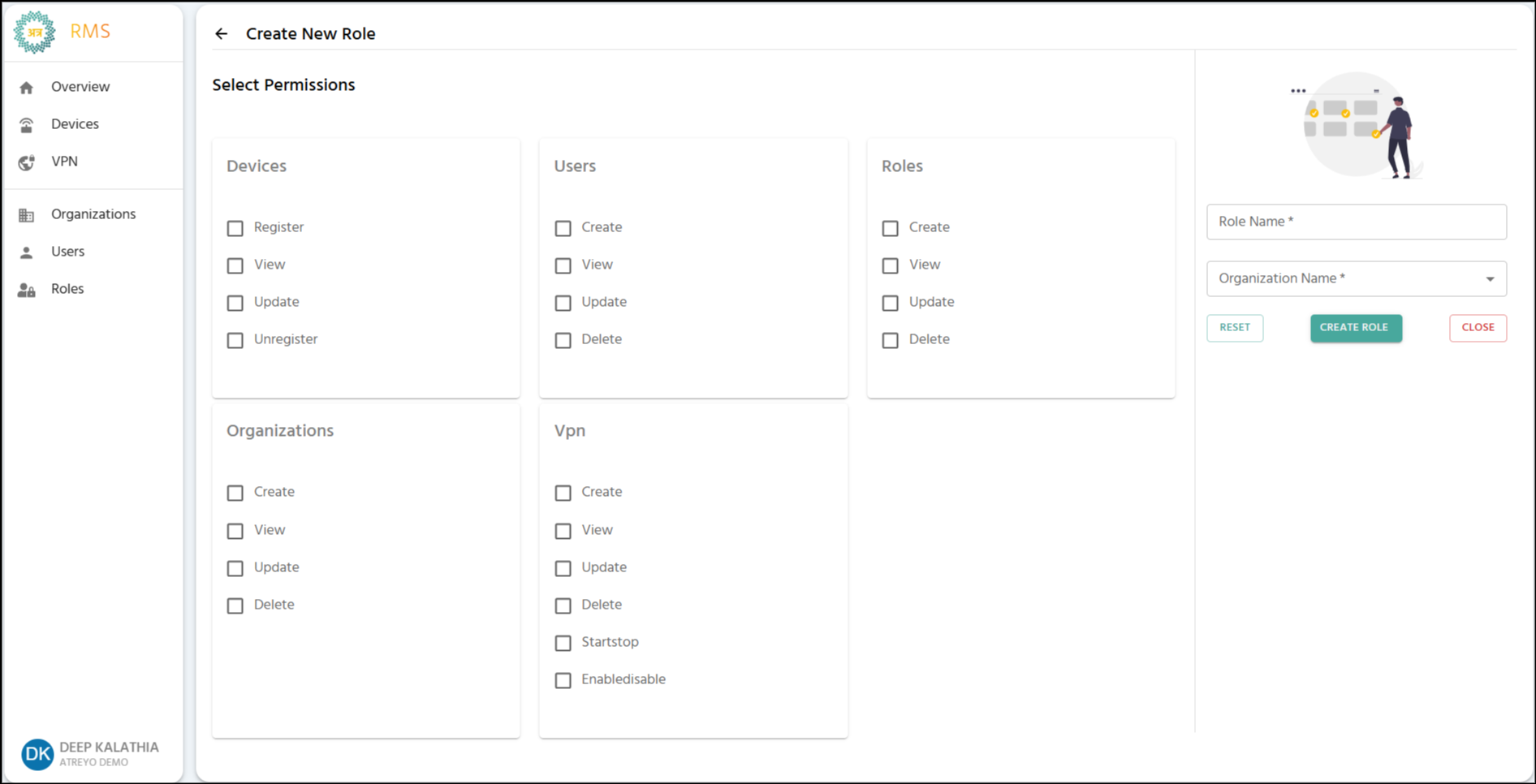
The "Create New Role" form is used to define a new role by assigning specific permissions across different sections.
Input Fields
Role Name*:
Enter the name for the new role.
Input Rules:
Admin__RoleRole--ManagerOrganization Name*:
Select the Organization
Check menu.permissions for each section
Click CREATE

Role Name Rules
✅ Valid: Company Admin, Device_Manager, Field-Technician
❌ Invalid: _Admin (starts with _), Role- (ends with -), Admin__Role (consecutive __)
Permission
Permissions areby organizedSection
1. five main sections.
Check the boxes to grant the corresponding abilities to the users who will be assigned this role.
Permissions Breakdown
Section
Permission
Description
Devices
Register
Allows the user to register new devices.
View
Allows the user to view the list and detail page of a device.
Update
Allows the user to change a device’s location or edit its description.
Unregister
Allows the user to remove a device from its assigned organization.
Users
Create
Allows the user to invite new users.
View
Allows the user to view the list of existing users.
Update
Allows the user to edit a user's name or change their assigned role.
Delete
Allows the user to delete a user account.
Roles
Create
Allows the user to define and create new roles.
View
Allows the user to view the list and profiles of roles.
Update
Allows the user to modify the name or permissions of an existing role.
Delete
Allows the user to delete a role.
Organizations
Create
Allows the user to create new child organizations.
View
Allows the user to view the list of organizations.
Update
Allows the user to modify the name of an organization.
Delete
Allows the user to delete an organization.
VPN
Create
Allows the user to create new VPN tunnels and add devices/users to them.
View
Allows the user to view the list and overview page of VPN tunnels.
Update
Allows the user to edit the name of a VPN tunnel.
Delete
Allows the user to delete a VPN tunnel, which also removes users and devices from it.
Start/Stop
Allows the user to start and stop an existing VPN tunnel.
Enable/Disable
Allows the user to enable and disable an existing VPN tunnel.
⚠️ Important Notes on Permissions
-
ViewRegisterDependency:-TheAddViewnewpermission for any section isrequiredif you intend to grant any other permission (Create,Update,Delete, etc.) in that same section.devices -
VPNViewDependency:- See device list and details
Edit To- grantModify anydevice info
VPNUnregister permissions,- theRemove Devices View permission must also be selected.devices
2. Users
Create - Invite new users
View - See user list
Edit - Change names/roles
Delete - Remove users
3. Roles
Create - Define new roles
View - See role list
Edit - Modify permissions and name
Delete - Remove roles
4. Organizations
Create - Add child organizations
View - See organization list
Edit - Change names
Delete - Remove organizations
5. VPN
Create - Make VPN tunnels
View - See VPN list
Edit - Change tunnel names
Delete - Remove tunnels, and remove devices and users from tunnel
Start/Stop - Control VPN process
Enable/Disable - Manage tunnel status
Permission Rules
⚠️ View Dependency
Must check View permission when checking any other permission in that section.
✅ Valid: Devices View + Register
❌ Invalid: Devices Register only (system auto check View)
⚠️ VPN Dependency
Must check Devices View when checking any VPN permission.
✅ Valid: VPN View + Devices View
❌ Invalid: VPN View only (system auto check Devices View)
Common Role Templates
System Administrator
✓ All permissions in all sections
Device Manager
✓ Devices: Register, View, Edit
✓ Users: View
✓ Organizations: View
Field Technician
✓ Devices: Register, View
Network Administrator
✓ Devices: View
✓ VPN: All permissions
Read-Only Viewer
✓ All sections: View only