
Role Creation Guide
Quick Steps
-
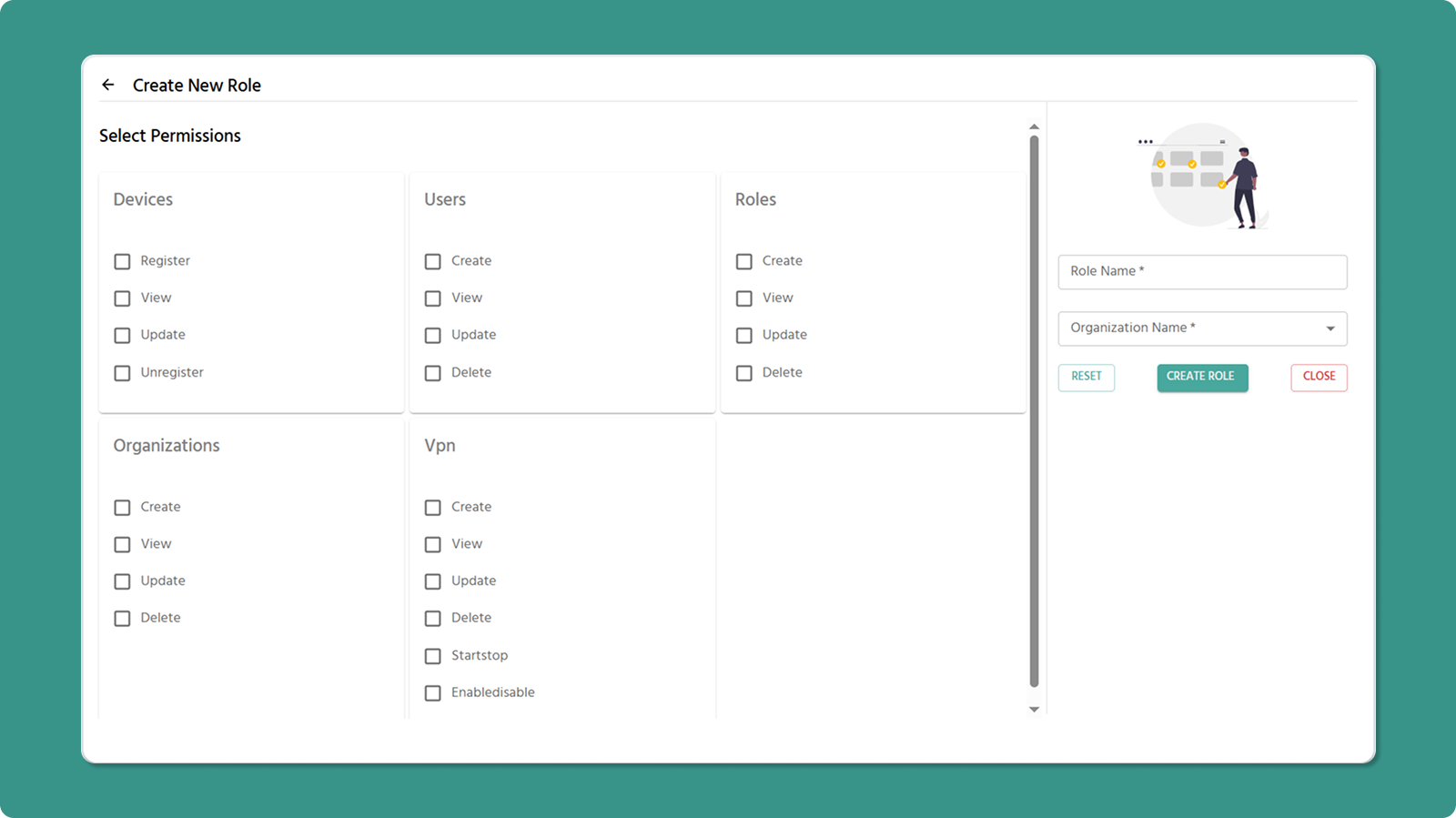
Click +CREATE ROLE button
-
Enter Role Name (3-50 characters, letters/numbers/spaces/-/_)
-
Select Organization
-
Check permissions for each section
-
Click CREATE
Role Name Rules
✅ Valid: Company Admin, Device_Manager, Field-Technician
❌ Invalid: _Admin (starts with _), Role- (ends with -), Admin__Role (consecutive __)
Permissions by Section
1. Devices
-
Register - Add new devices
-
View - See device list and details
-
Edit - Modify device info
-
Unregister - Remove devices
2. Users
-
Create - Invite new users
-
View - See user list
-
Edit - Change names/roles
-
Delete - Remove users
3. Roles
-
Create - Define new roles
-
View - See role list
-
Edit - Modify permissions and name
-
Delete - Remove roles
4. Organizations
-
Create - Add child organizations
-
View - See organization list
-
Edit - Change names
-
Delete - Remove organizations
5. VPN
-
Create - Make VPN tunnels
-
View - See VPN list
-
Edit - Change tunnel names
-
Delete - Remove tunnels, and remove devices and users from tunnel
-
Start/Stop - Control VPN process
-
Enable/Disable - Manage tunnel status
Permission Rules
⚠️ View Dependency
Must check View permission when checking any other permission in that section.
✅ Valid: Devices View + Register
❌ Invalid: Devices Register only (system auto check View)
⚠️ VPN Dependency
Must check Devices View when checking any VPN permission.
✅ Valid: VPN View + Devices View
❌ Invalid: VPN View only (system auto check Devices View)
Common Role Templates
System Administrator
✓ All permissions in all sections
Device Manager
✓ Devices: Register, View, Edit
✓ Users: View
✓ Organizations: View
Field Technician
✓ Devices: Register, View
Network Administrator
✓ Devices: View
✓ VPN: All permissions
Read-Only Viewer
✓ All sections: View only