
Understanding Role Permissions
Click any role name in the list to open the Role Detail Page.
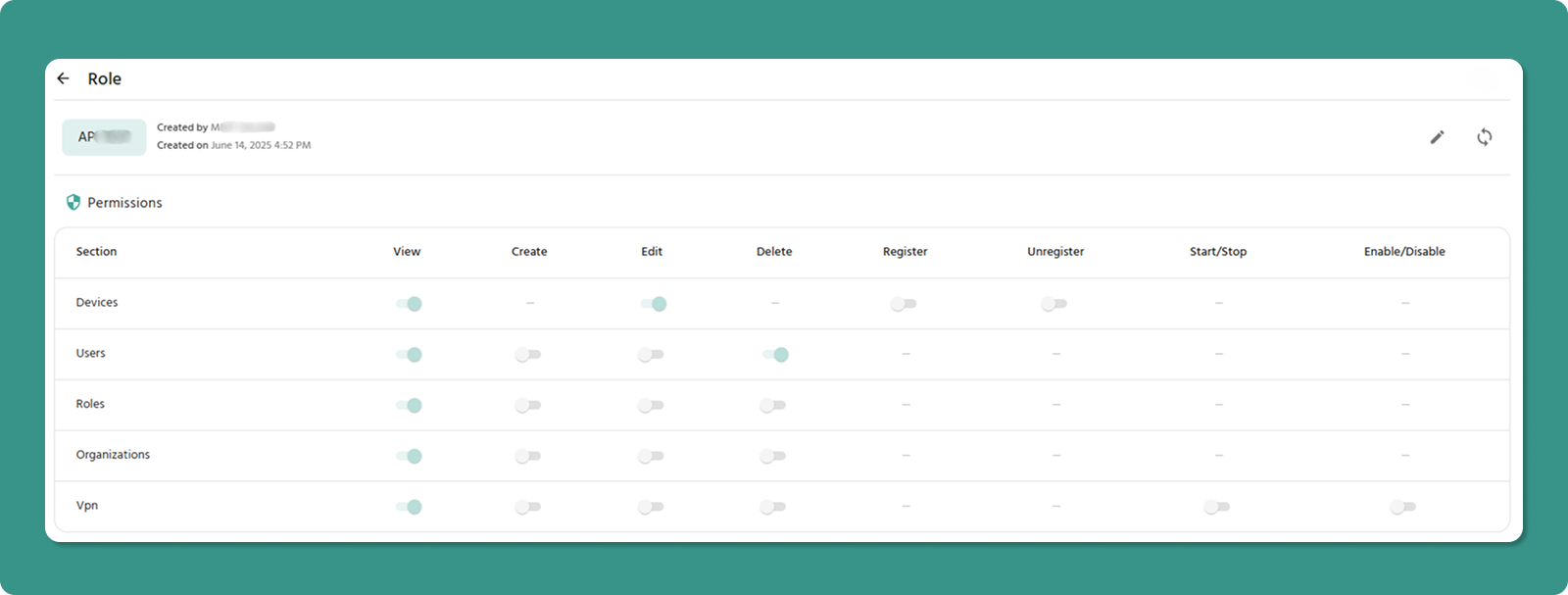
Role Detail Page Shows:
-
Role name and metadata (Created By, Created On)
-
Permissions table with all sections
-
Edit button (✏️) to modify role
-
Refresh button (🔄) to update data
Permissions Table
Displays all permissions in table format with toggle switches.
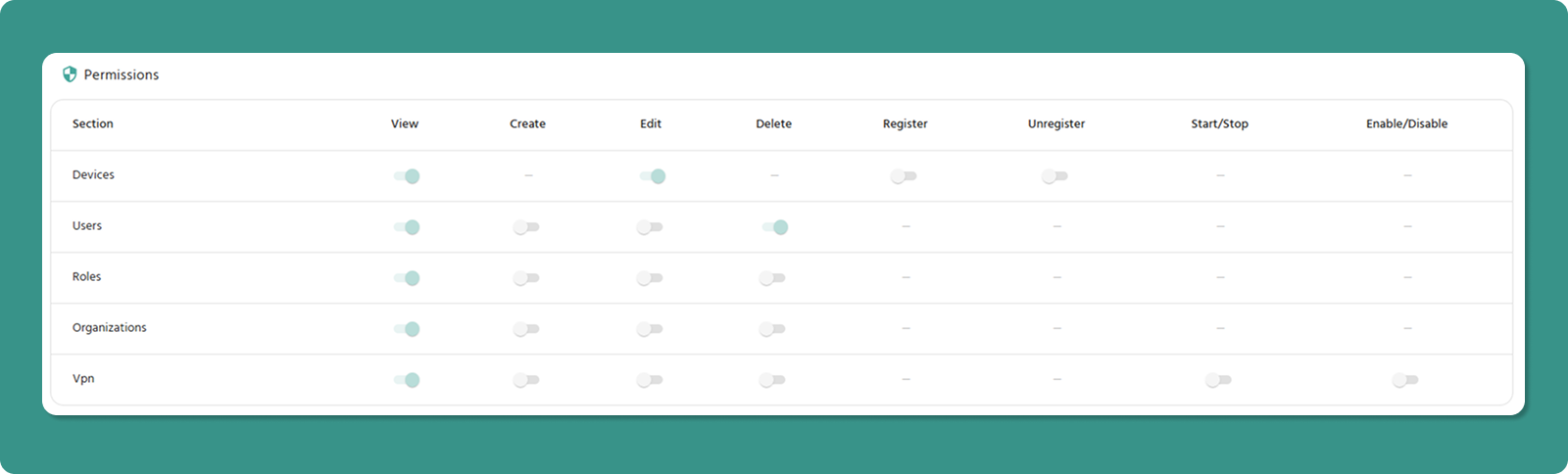
Columns: Section | View | Create | Edit | Delete | Register | Unregister | Start/Stop | Enable/Disable
Toggle States:
-
ON (Teal/Green, right position) - Permission granted
-
OFF (Gray, left position) - Permission not granted
Section-Specific Columns:
-
Register/Unregister - Devices only
-
Start/Stop, Enable/Disable - VPN only
-
Dashes (-) - Not applicable
Editing a Role
Entering Edit Mode
-
Open Role Detail Page (click role name)
-
Click Edit button (✏️) in header
-
Page becomes editable
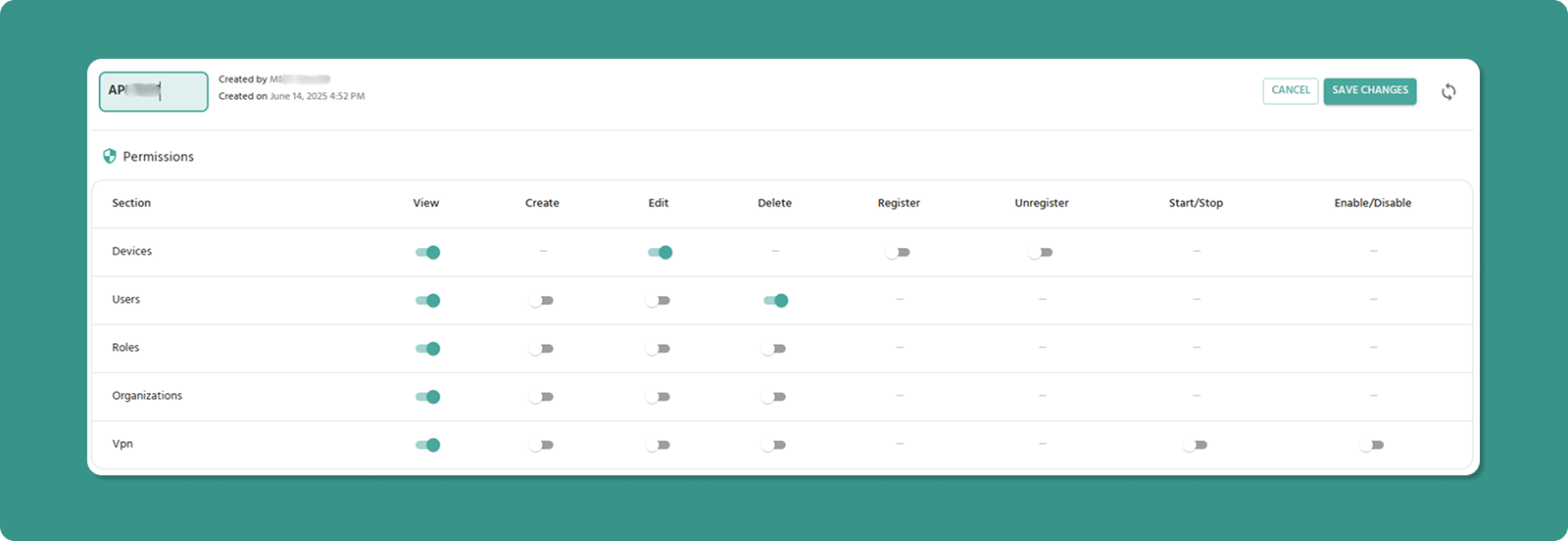
What Changes in Edit Mode
Role Name: Becomes text input field (editable)
Toggle Switches: Become active (clickable)
Buttons: SAVE CHANGES and CANCEL appear
Modifying Permissions
To Grant Permission:
-
Click toggle switch (currently OFF/gray)
-
Switch moves right, turns teal/green
-
Permission granted when saved
To Revoke Permission:
-
Click toggle switch (currently ON/teal)
-
Switch moves left, turns gray
-
Permission revoked when saved
Dependency Enforcement
System automatically maintains dependencies:
View Dependency:
-
Turning ON any permission → Auto-enables View
-
Turning OFF View → Auto-disables other permissions in that section
VPN Dependency:
-
Turning ON any VPN permission → Auto-enables Devices View
-
Turning OFF Devices View → Auto-disables all VPN permissions
Saving Changes
-
Review all modifications
-
Click SAVE CHANGES button (teal)
-
Changes apply immediately to all users with this role
To Discard Changes: Click CANCEL button (red)
Important Notes
Company Admin Role
⚠️ Cannot be edited - System-protected role with full access. Edit button is hidden.
Need custom admin? Create a new role with desired permissions.
Permission Changes
✅ Take effect immediately after saving
⚠️ Users may need to refresh browser to see changes
💡 Best practice: Notify users before major permission changes
Browser Refresh
⚠️ Refreshing browser in Edit Mode loses all unsaved changes